Thursday, 14 March 2013

Description

Here are the descriptions for the following terms:

HTML(Hypertext Markup Language): Is the language that web pages are written in, these websites can then be viewed by anyone else connected to the Internet. HTML consists of a series of short codes typed into a text-file by the site author — these are the tags. The text is then saved as a html file, and viewed through a browser. The tags are what separate normal text from HTML code. Different tags will perform different functions. The tags themselves don’t appear when you view your page through a browser, but their effects do. An examlpe of this would be:
 <b>these words would be bold< /b> and these wont be

CSS(cascading style sheets): A way for Web developers to define the look and feel of their Web pages. It was intended to allow developers to separate content from design so that HTML could perform more of the function that it was originally based on - the markup of content, without worry about the design and layout. Style sheet refers to the document itself. They are the technical specifications for a layout, whether print or online. Print designers use style sheets to insure that their designs are printed exactly to specifications. For example if a developer wanted the text in the maincontent to be blue he would do:
#maincontent
{
color: blue;
}

Komodo Edit: This is a open source language editor which allows the user to develop languages such as HTML and CSS. You can get extensions for it to add on languages or other helpful features (like special characters). Here are some of the Komodo Edit features:
  • Text editor

  • HTML validator

  • Accessibility validator

  • CSS validator

  • XML validator

  • Page preview

  • Save pages as HTML with DTD

  • Write HTML 5 documents

  • Write XHTML documents


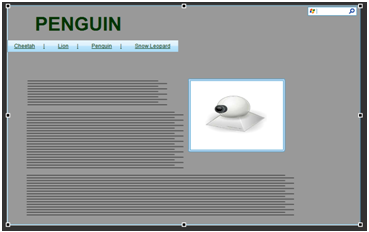
  •  Lumzy: Lumzy is a design creation tool for websites and applications. You can add events to controls, place controls inside other containers and emulate your website with easy page navigation triggered by user actions. It is simple to use because you can just grab any picture or naivgation and lay out anywhere you wish to on the canvas. It also lets you change the theme of your website from Apple or Microsoft.

    Microsoft Paint:  Microsoft Paint or 'MS Paint' is a basic graphics/painting utility that is included in all the Microsoft Windows versions. MS Paint can be used to draw, colour and edit pictures including imported pictures from a digital camera for example. MS Paint is found in the Windows Start menu within the Accessories Folder. It can save creations in standard formats such as .jpg and .bmp.

    Lorem Ipsum: Lorem Ipsum is a group of text that people commonly use as filler text, or dummy text. It’s basically a bunch of mumbo-jumbo that people use to show what a design layout will look like when the proper text has been inserted.


    BIBLIOGRAPHY

    Your Html Source, date accessed: 14/03/2013:
    http://www.yourhtmlsource.com/starthere/whatishtml.html

    Web Design. date accessed: 14/03/2013:
    http://webdesign.about.com/od/beginningcss/a/aa021607.htm

    Mashable, date accessed: 14/03/2013:
    http://mashable.com/2010/07/15/wireframing-tools/

    Digital Unite, date accessed: 14/03/2013:
    http://digitalunite.com/guides/microsoft-programs/what-microsoft-paint

    Make use of, date accessed: 14/03/2013
    http://www.makeuseof.com/tag/lorem-ipsum-case-wondering/
    1) Website Title: Animal Planet

    2) The website will feature information about animals. It have a fact file of 4 different Animals and a homepage:

    Page one: homepage with a description of the website and links to the other pages.

    Page two: Fact file about Cheetah's
    Page three: Fact file about Penguins

    Page four: Fact file about Snow Leopard
    Page five: Fact file about Lions
     
     
    Description of Web Page
    The website that I have created is in a 2 collumn lay out. The container for my website is 1200px, It is about animals and has fact files about 4 different animals with a home page. I have chosen a eagle as a logo for the website which will feature on all the web pages. In the right content I have links to different websites which relate to Animals. My navigation changes colour each time depending on the web page you are on. As the user hovers over the naivgation, it changes colour to white to show that it is active. Each webpage has its own theme according to the animal it is describing. The main content has got text in paragraphs with a picture inside them. 


    Tuesday, 18 December 2012

    Box Model


    CSS BOX MODEL


    All HTML elements can be considered as boxes. In CSS, the term "box model" is used when talking about design and layout. The CSS box model is essentially a box that wraps around HTML elements, and it consists of: margins, borders, padding, and the actual content.
    The box model allows us to place a border around elements and space elements in relation to other elements.


  • Margin -The margin is the length between the border and the browser - <div class="margin">

  • .margin
    {
    width:100px;
    }
  • Border - A border that goes around the padding and content. The border is affected by the background color of the box- <div class="border">

  • .border
    {
    color:yellow;
    }
  • Padding - Clears an area around the content. The padding is affected by the background color of the box- <div class="padding">

  • .padding
    {
    width:100px;
    }
  • Content - The content of the box, where text and images appear-
  • <div class="content">

    .content
    {
    background: blue;
    color:yellow;
    }


    Bibliography

    Tuesday, 13 November 2012

    U20P1 - Explain how HTML files access CSS


    Features of web development -

    In the following post I would describe styling methods in CSS these are Inline, Internal and External.

    Inline

    HTML is used for layout
    CSS is used to format web pages
    The structure of CSS

    the CSS is attached to the HTML element e.g. <h1 style="color:blue;">
    • This code is useful if you need to use the style only once
    • Limitations are that if you need the style again you need to write the code again and every time you use it.
    • Has to be created and repeated for every task
    Advantages
    • The website such as Blogs where there are only limited number of pages, using of Inline CSS helps users and service provider. It is also useful when designers are testing a web page and encouter a problem which can not be easily fixed. 
    Disadvantages
    •  Inline styles must be applied to every element you want them on. So if you want all your paragraphs to have the font family “Arial” you have to add an inline style to each <p> tag in your document. This adds both maintenance work for the designer and download time for the reader.

    Internal

    the CSS is described in the <HEAD> tag e.g.
    <head>
    <style>
    h1{
    color:blue;
    }
    </style>
    </head>
    • Is useful for using one page because it can be carried on for a certain tag within that page
    • Not useful for multiple pages as they don't carry on 
    • Has to be entered once every page
    Advantages
    • Manage styling within a single document. Also Internal styles do not need not be applied to every element. So if you want all your paragraphs to have the font family “Arial” you have to add an Inline style <p> tag in Internal Style document.
    Disadvantages
    • Hard to maintain consistency across several related web pages
    •  This method can’t be used if you want to use it on multiple web pages.

    External

    <head>
    <link rel="stylesheet" href="style.css">
    </head>
    • links to an external style sheet where the tag is entered
    • Most useful because it cam be carried on for a tag for multiple pages
    • Has to be entered once
    Advantages
    • Can link to multiple documents
    • By including the styling of the text in a separate file, you can dramatically decrease the file-size of your pages.
    Disadvantages
    • Takes longer typing it out for smaller websites

    Bibliography